Understanding downgrade and upgrade rights across product versions
When you have multiple versions of the same product in your environment, the platform can apply downgrade rights to cover demand for older product versions using newer-version entitlements, provided the license metric and model match.
During a compliance calculation, the platform first groups entitlements that belong to the same product family and share the same license model and metric. It then orders the product versions by release date and compares their balances. If a newer version has a surplus (positive balance) and an older version has a deficit (negative balance), the platform transfers the available surplus to cover the demand of the lower version, up to the required amount.
Example: Windows Server 2025 Standard covering Windows Server 2022 Standard demand
Assume your environment has both Windows Server 2025 Standard and Windows Server 2022 Standard installed on different devices, with no separate Windows Server 2022 entitlement. The platform automatically creates a placeholder entitlement for Windows Server 2022 Standard to represent the uncovered demand and includes it in the compliance family. After the downgrade calculation, the Compliance overview shows:
Product |
Entitled |
Downgrade |
Upgrade |
Demand |
Balance / Status |
|---|---|---|---|---|---|
Windows Server 2025 Standard |
1,000 |
−35 |
0 |
860 |
105 / Over-licensed |
Windows Server 2022 Standard |
0 |
+35 |
0 |
35 |
0 / Compliant |
In this example:
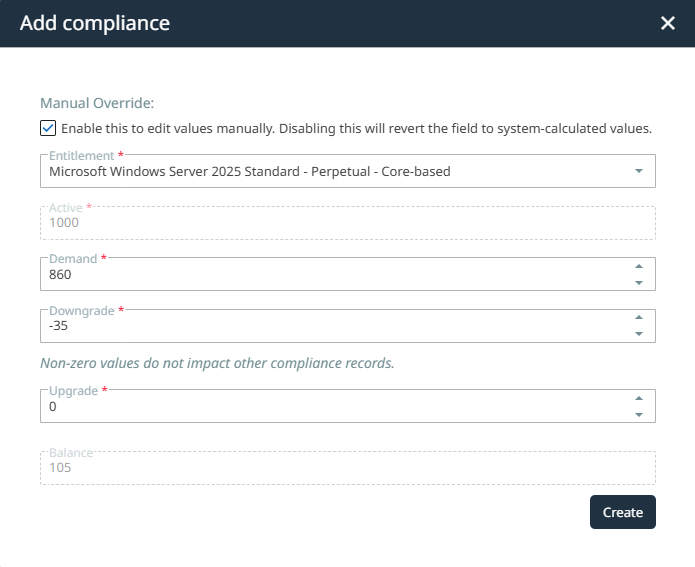
•Windows Server 2025 Standard: has a surplus after covering its own demand. 35 cores are donated via downgrade rights to cover the Windows Server 2022 demand. The Downgrade value of −35 means 35 cores were transferred out.
•Windows Server 2022 Standard: has no purchased entitlement but receives 35 cores from the newer version via downgrade. The Downgrade value of +35 means 35 cores were received. The Windows Server 2022 demand is fully covered without requiring a separate license contract.
Upgrade rights
Upgrade rights work in the opposite direction: an older version entitlement can cover demand for a newer version. For Windows Server, this typically requires an active Maintenance license on the source entitlement. If the platform detects that maintenance is required and no maintenance entitlement exists, the upgrade transfer is not applied.
In the Compliance overview, a positive Upgrade value means licenses were received from an older version; a negative Upgrade value means licenses were donated to a newer version.
When no automatic downgrade or upgrade applies
If a compliance record was created with Manual Override enabled, the platform does not automatically calculate Downgrade and Upgrade. In that case, enter the transfer quantities manually in the Add/Edit compliance dialog. Positive values indicate received licenses; negative values indicate donated licenses.
Important: Automatic downgrade and upgrade rights are currently supported for Windows Server and SQL Server products. For other products, version coverage is not automatically calculated and must be entered manually using the Manual Override option in the compliance record.