The License Management Workspace Dashboard in Raynet One serves as the central overview screen for License Management activities. Access the License Management Workspace via the left sidebar under Workspaces > License Management.
It delivers an at-a-glance summary of your entire software license landscape and highlights where action may be required.
Instead of requiring users to switch between contracts, entitlements, compliance, and optimization views, this dashboard condenses the most relevant LM information into one overview. This supports fast decisions, early risk detection, and direct navigation into the relevant detailed areas.
Overall Purpose
The primary purpose of the License Management Workspace Dashboard is to provide immediate visibility and actionable insights. It gives SAM teams and decision-makers a consolidated high-level summary that highlights risks and opportunities early. The dashboard acts as an operational entry point for reviewing license health, identifying compliance risks, monitoring upcoming deadlines, and detecting potential cost-saving opportunities.
Layout and Structure
The dashboard follows a clean, widget-based layout divided into logical sections:
•Top KPI Cards: Four prominent key figures provide instant orientation (License products, Expiring products, Compliant software percentage, and Over-licensed balance with its financial value).
•Main Content Area: Arranged in a responsive grid with visual widgets and lists. These include donut charts, asset and activity summaries, top lists, and cost-saving indicators.
Each section includes a More insights link for quick drill-down into the relevant detailed view. The design is overview-oriented: visual indicators, clear labels, and warnings help users identify critical areas without opening detailed reports first.
What the User sees
Users see a current snapshot of their license portfolio, including the following key areas:
Top KPIs
Four essential metrics at the top provide instant orientation:
•Licensed products: Shows the current number of products managed in the license portfolio.
•Expiring products: Shows products or license-related items that require attention because of upcoming expiration dates.
•Compliant software: Shows the overall compliance level across the portfolio.
•Over-licensed balance: Shows the current over-licensed financial value and indicates potential savings opportunities.
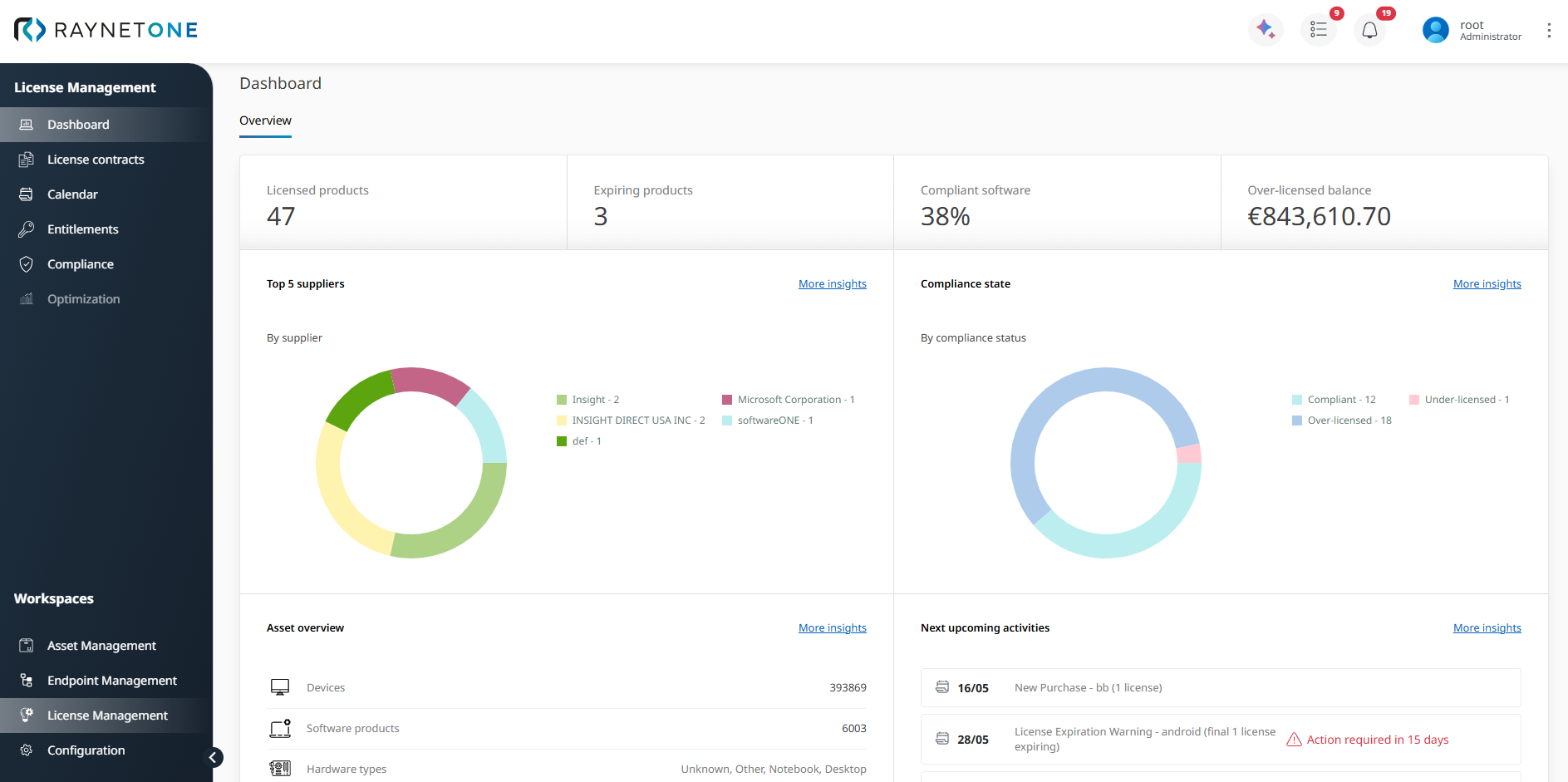
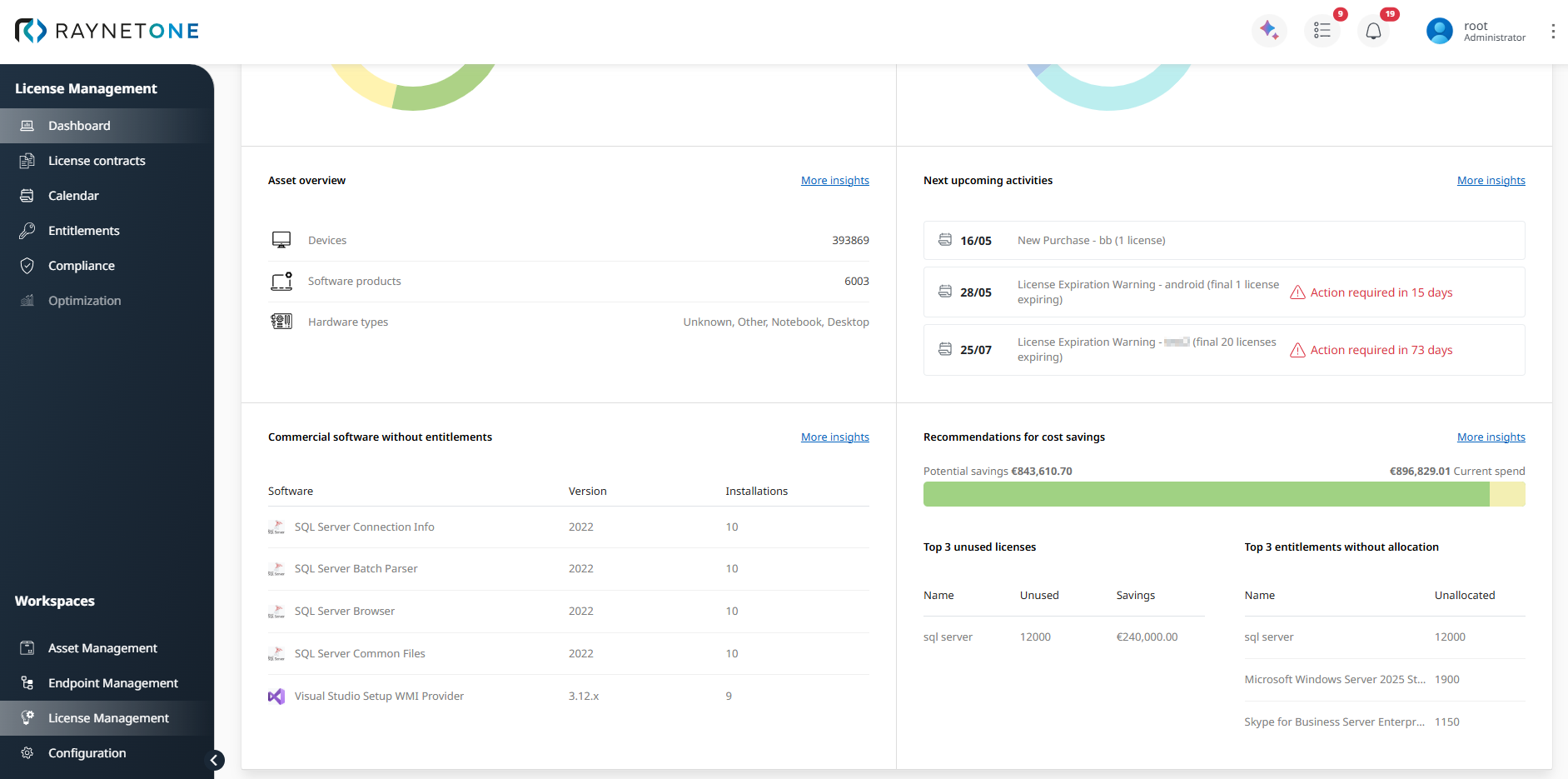
The screenshot above shows the upper dashboard area. The following screenshot shows the lower dashboard area, including Commercial software without entitlements and Recommendations for cost savings.
Top 5 suppliers
This dashboard section uses a donut chart to visualize the distribution of licensed products by supplier. This quickly shows which vendors dominate your license spend and where supplier-focused review or optimization deliver the highest impact.
Compliance state
This dashboard section uses a donut chart to visualize the software portfolio by compliance state, such as compliant, under-licensed, and over-licensed positions. It gives users a high-level health status of the license portfolio at a glance. Detailed reconciliation and ELP analysis are handled in the dedicated Compliance section.
Asset overview
The Asset overview dashboard section connects LM with the technical estate. It shows key infrastructure context, such as the total number of devices and discovered software products.
Next upcoming activities
This dashboard section lists time-sensitive LM activities, such as license expirations, renewal dates, or contract-related deadlines. Clear warning messages (e.g., Action required in 8 days), help users identify items that need attention soon.
This section supports lifecycle and renewal management by guiding users directly to the Calendar for full renewal and lifecycle tracking.
Commercial software without entitlements
This dashboard section shows a top list of commercial software installations that have been discovered in the environment but are not yet covered by any license entitlement. These items represent a major compliance and financial risk area that may require immediate review.
Recommendations for cost savings
Recommendations for cost savings provides a ranked overview of data-based optimization opportunities, such as the Top 3 unused licenses and the Top 3 entitlements without allocation. These findings help users identify where license reclamation, reallocation, or entitlement cleanup may reduce unnecessary software spend.
The License Management Workspace Dashboard is designed as a dynamic monitoring and navigation layer - not a static report. It efficiently guides users from broad visibility to targeted analysis and concrete actions across the full license lifecycle.