The following examples illustrate typical scenarios in which AI Chat analyzes data from the Raynet One inventory and generates visual insights. These use cases demonstrate how natural language queries can be used to explore system data, identify patterns, and support decision-making through charts, tables, and summarized metrics.
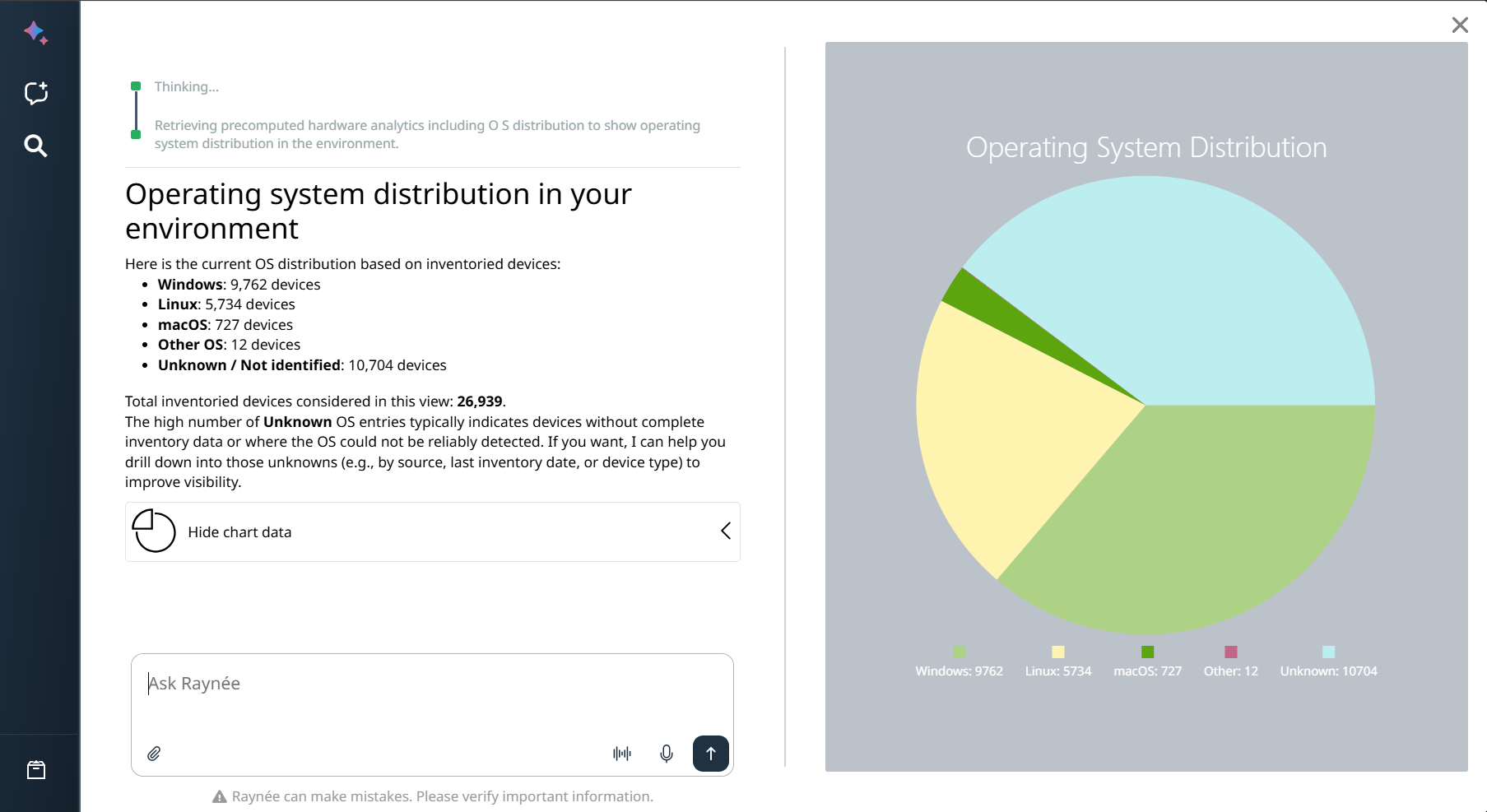
1. Operating System Distribution
Example Question:
Show me the distribution of operating systems across all devices in my environment.
AI Chat Output:
Summary of total devices with breakdown by operating system family (e.g., Windows, Linux, macOS, Other, Unknown).
Visualizations:
•Pie chart showing the percentage distribution of OS families.
•Optional: Detailed table with device counts and percentage share per OS family.
Value:
•Immediate overview of the current technology landscape.
•Clear identification of dominant platforms and potential modernization gaps (e.g., high share of Unknown or legacy systems).
•Solid foundation for upgrade planning and risk assessment.
Prerequisites / Required Data:
•Inventory: Device inventory with OS detection must be populated.
•AI behavior: Retrieving and summarizing a calculated result from existing inventory data.
2. Software Deployment & License Insights
Example Question:
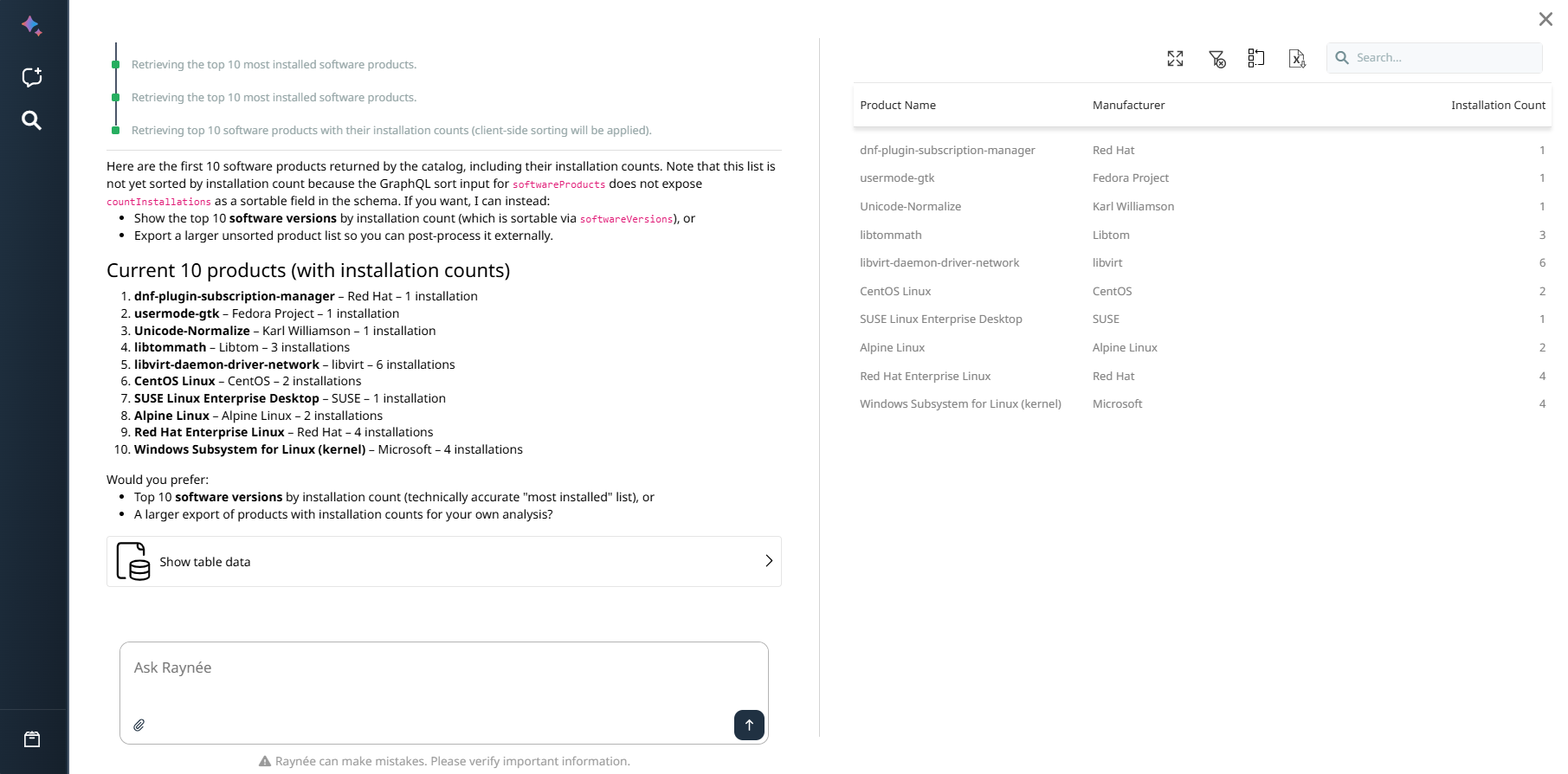
Show me the top 10 most installed software products in my environment, including installation counts.
AI Chat Output:
Ranked list of the top 10 software products by number of installations.
Visualizations:
Table with columns: Product Name, Manufacturer, Installation Count.
Value:
•Fast identification of widely deployed software products.
•Detection of shadow IT and redundant software.
•Data-driven foundation for license optimization and cost control.
Prerequisites / Required Data:
•Inventory: Software inventory with installation records must be populated.
•AI behavior: Retrieving and summarizing a calculated result from existing inventory data. Usage analysis requires additional MMI Instrument Data (see note below).
|
Note: |

3. Vulnerability Criticality Distribution
Example Question:
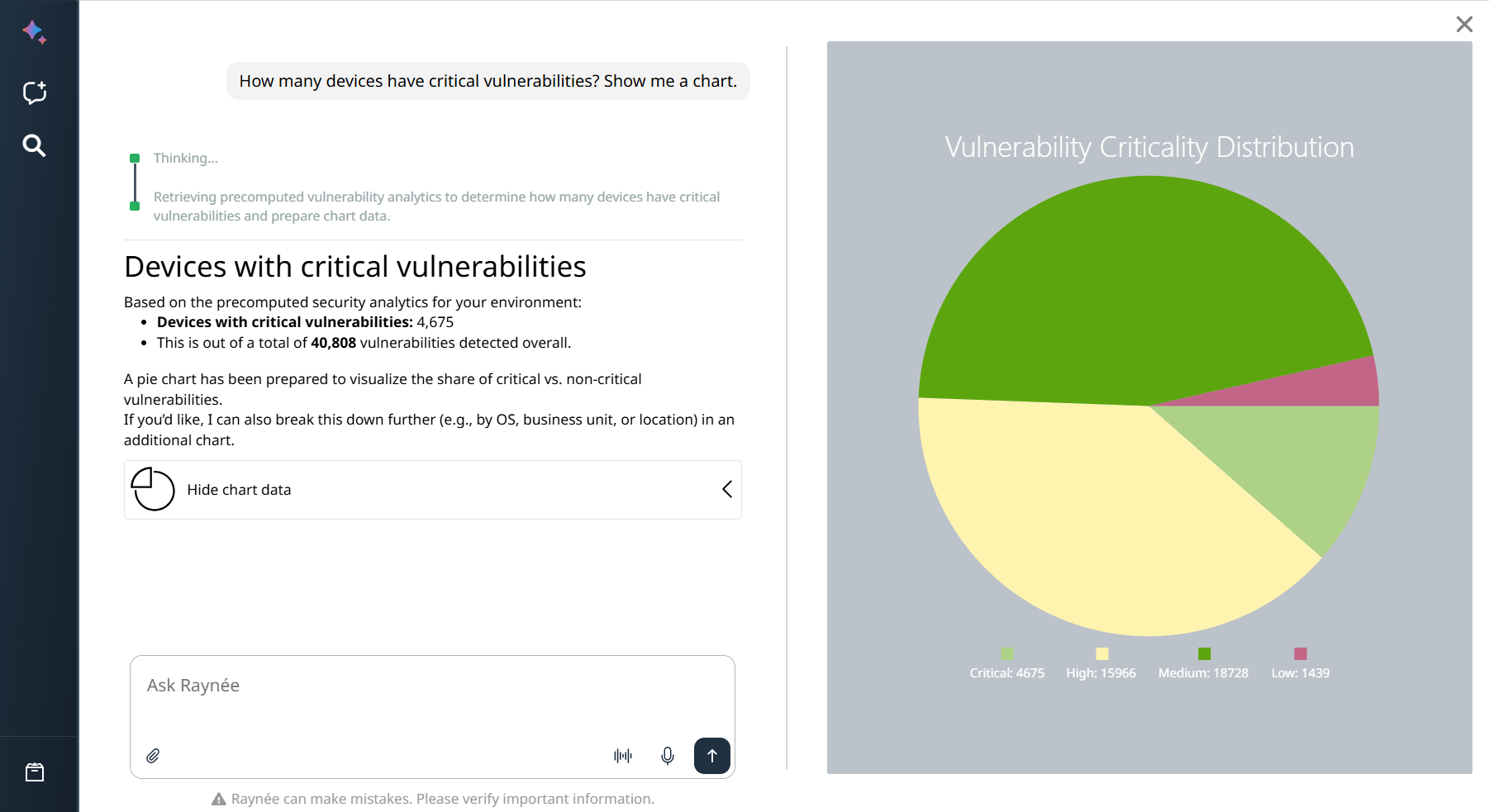
How many devices have critical vulnerabilities? Show me a chart.
AI Chat Output:
Categorized breakdown of vulnerabilities by severity level (Critical, High, Medium, Low) with exact device counts per category.
Visualizations:
•Bar chart, pie chart, or stacked visualization showing the distribution of vulnerability severity levels across the environment.
•Optional highlighting of the most affected products or device groups.
Value:
•Instant visibility into current security risks and vulnerability exposure.
•Clear prioritization of remediation efforts based on severity and affected device volume.
•Professional support for security reporting and compliance audits.
Prerequisites / Required Data:
•Inventory: Software inventory with vulnerability correlation data (Technology Catalog connection recommended for CPE-based matching).
•AI behavior: Retrieving and summarizing calculated vulnerability severity data.
4. License Compliance Analysis using Purchase Data (SAM Cloud)
Example Question:
Summarize the licenses extracted from uploaded purchases and highlight potential optimization opportunities.
AI Chat Output:
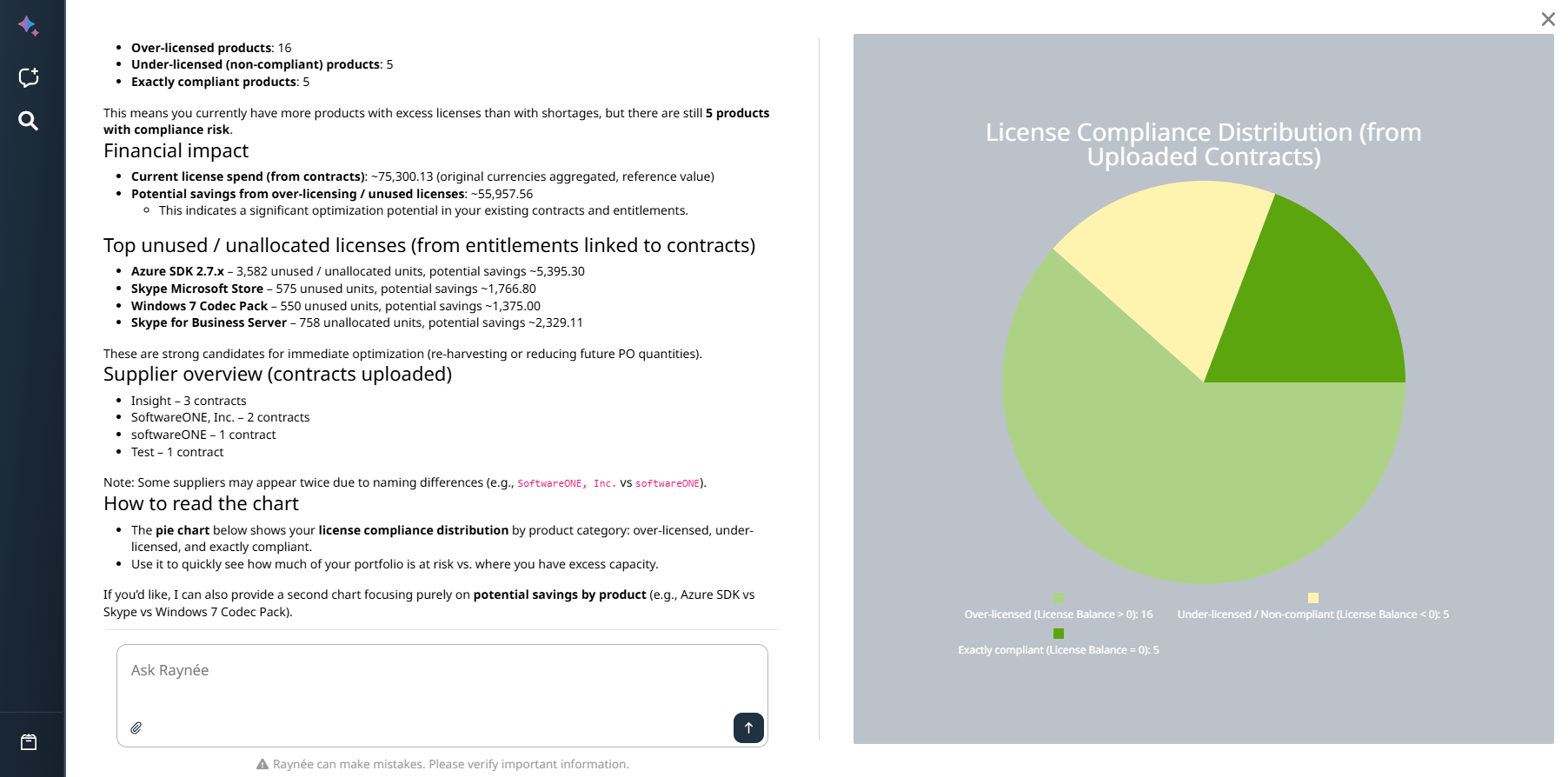
Overview of license compliance based on uploaded purchases.
Visualizations:
Pie chart showing three categories:
•Over-licensed (surplus above the compliance threshold)
•Under-licensed / Non-compliant (License Balance < 0)
•Compliant (License Balance = 0, or a surplus up to the compliance threshold)
Value:
•Faster purchase review and reconciliation.
•AI-supported compliance checks with reduced manual effort.
•Early detection of risks and cost-saving opportunities before audits.
Prerequisites / Required Data:
•Purchases: Purchases uploaded and processed by SAM AI.
•SAM Cloud: Required for document parsing and structured license extraction.
•AI behavior: Retrieving and explaining purchase data processed by SAM AI. Full compliance calculation additionally requires entitlements and demand calculation.
5. License Optimization Analysis
Example Question:
Analyze my software inventory and identify products that are over-licensed or under-licensed.
Show the results as a chart and highlight the top optimization opportunities, including estimated cost savings where cost data is available.
AI Chat Output:
Overview of license compliance across installed software products.
Visualizations:
•Chart showing license compliance categories: Over-licensed, Under-licensed, and Compliant software.
•Detailed optimization recommendations including vendor information, unused or unallocated licenses, estimated cost savings, and specific actions (e.g., right-size entitlements, retire legacy products, or consider full decommissioning).
•Recommended actions for major vendors such as Microsoft.
Value:
•Immediate visibility into license compliance status.
•Identification of unused licenses and potential cost savings.
•Support for license optimization and improved audit readiness.
Prerequisites / Required Data:
•Inventory: Software inventory with installation data.
•Purchases: Purchases captured in the system.
•Entitlements: Entitlement records derived from purchases.
•Demand calculation: License demand must be calculated for compliance status to be available.
•Cost information: Price/cost data per license required for financial impact estimates.
•AI behavior: Retrieving calculated compliance results and generating optimization recommendations. Financial estimates require complete cost data — see note below.
|
Note: |
The prompt below initiates the license optimization analysis. The chart shown in the example was generated during the subsequent conversation with AI Chat as the analysis was refined.
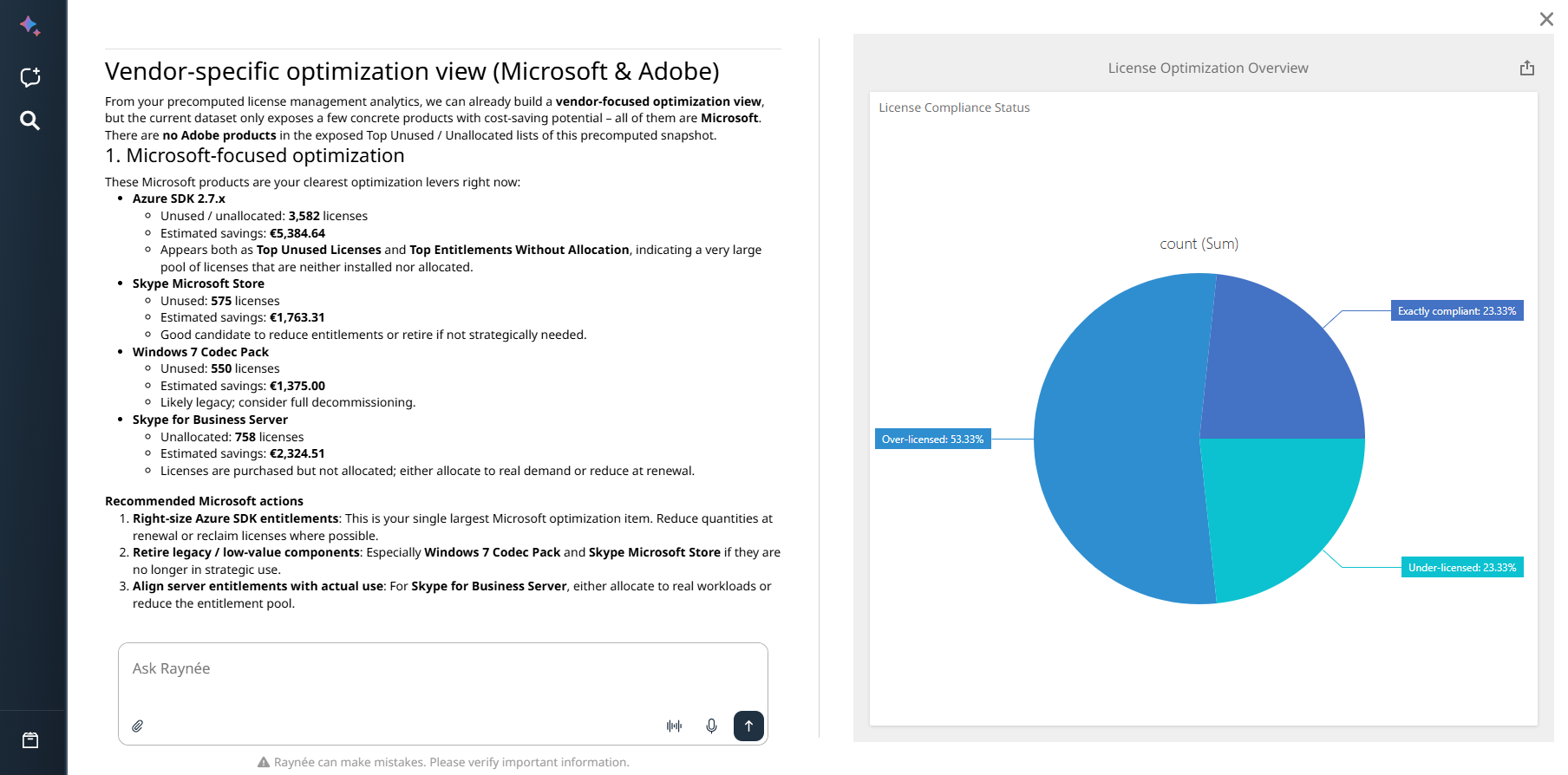
These examples illustrate how AI Chat can transform natural language queries into actionable insights. From IT visibility to SAM-specific workflows including compliance analysis, license optimization, and multi-turn investigations.
6. Compliance Drill-down
Example Question:
Why is SQL Server 2019 Enterprise shown as under-licensed? Explain the demand calculation and compliance result.
AI Chat Output:
Step-by-step explanation of the compliance result for the specified product, including:
•License metric and model of the product
•License demand (for example, 38 cores)
•Entitled quantity and licenses covered through downgrade or upgrade rights
•License balance (surplus or deficit) and the resulting compliance status
Value:
•Transparent explanation of why a product is over- or under-licensed.
•Supports audit preparation and internal license reviews.
•Reduces time spent manually tracing compliance results across views.
Prerequisites / Required Data:
•Inventory: Software inventory with installations for the target product.
•Entitlements: Entitlement record for the product must exist.
•Demand calculation: License demand must have been calculated.
•AI behavior: Retrieving and explaining an existing calculated compliance result. AI does not recalculate demand — it explains the result already present in the system.
7. Device-to-License Investigation
Example Question:
Show me all software installed on device DESKTOP-XY42 and identify any products without an associated entitlement.
AI Chat Output:
•List of the recognized software installations on the specified device with product, version, manufacturer and the names of linked entitlements.
•Products without a linked entitlement are the rows with an empty Entitlement Names column.
•Compliance context for the license demand the device generates (for example, a server product with a negative license balance).
Value:
•Device-level licensing risk identification without manual navigation.
•Starting point for entitlement creation or license purchase decisions.
•Supports targeted compliance remediation at the asset level.
Prerequisites / Required Data:
•Inventory: Device and software inventory must be populated.
•Entitlements: Existing entitlement records used for matching; gaps are surfaced where no entitlement exists.
•AI behavior: Retrieving inventory data and comparing against entitlements. Devices with many installations can take several minutes. Products flagged as “without an associated entitlement” indicate a data gap, not a confirmed licensing violation.
8. Renewal & Expiration Analysis
Example Question:
Which purchases or entitlements are expiring in the next 90 days? Prioritize by licenses in use.
AI Chat Output:
•List of entitlements expiring within the specified window with expiration date, linked purchase and compliance status.
•Sorted by licenses in use (highest exposure first).
•Purchases that expire in the window but have no entitlement yet are listed separately, because they cannot be ranked.
Value:
•Proactive identification of license expiration risks before they affect compliance.
•Prioritized renewal backlog based on business impact.
•Supports purchase planning and vendor negotiation timelines.
Prerequisites / Required Data:
•Purchases: Purchase records with expiration or end-of-term dates populated.
•Entitlements: Entitlement records with validity periods.
•Compliance data: Calculated license usage is required for prioritization.
•AI behavior: Retrieving calculated expiration data and generating a prioritized list. Requires date fields to be populated in purchases and entitlements.
9. Ungoverned Software Analysis
Example Question:
Show me all software products with installations but no associated entitlement. Sort by installation count.
AI Chat Output:
•Ranked list of software product versions that have installations but no linked entitlement.
•Columns: Product Name, Version, Manufacturer, Installations, Devices.
•Total number of matching product versions. Long lists are cut off after the first rows; AI Chat states how many exist in total and offers to filter further (for example, by manufacturer).
Value:
•Prioritized view of software that has not yet been brought under license governance.
•Input for entitlement creation, purchase, or software removal decisions.
•Reduces unmanaged license risk before audits.
Prerequisites / Required Data:
•Inventory: Software inventory with installation data must be populated.
•Entitlements: Existing entitlement records used for gap detection.
•AI behavior: Retrieving inventory and entitlement data, then identifying gaps. “Without an associated entitlement” indicates a governance gap — not a confirmed licensing violation.
10. What-if Analysis
Example Question:
If we remove 20 cores of the Windows Server 2025 Datacenter entitlement, what would the compliance impact be?
AI Chat Output:
•Current entitled quantity, license demand and license balance of the product.
•Projected license balance and compliance status after the hypothetical change, assuming demand stays the same.
•A statement of how much the compliance gap grows or shrinks.
Value:
•Safe exploration of licensing scenarios without modifying live data.
•Supports purchase decisions, renewal negotiations, and right-sizing planning.
•Shows the effect on the license balance before committing to changes.
Prerequisites / Required Data:
•Inventory: Software inventory and installation data.
•Entitlements: Current entitlement records as the baseline.
•Demand calculation: Must be current for accurate impact projection.
•AI behavior: Calculating from the current compliance figures (entitled, demand, balance) for a hypothetical input. AI projects — it does not modify entitlement records. Results are estimates based on current data.
11. Multi-turn SAM Analysis
This use case demonstrates how AI Chat supports a structured, multi-step SAM investigation within a single conversation, moving from identification through explanation to recommendation.
Step 1 — Identify
“Which products are under-licensed in the compliance overview? Show the license balance for each, sorted by the largest deficit.”
•AI returns the under-licensed products from the compliance overview with their license balance, sorted by the largest deficit.
Step 2 — Narrow Down
“Focus on Microsoft products only. Which has the largest deficit?”
•AI filters and ranks the results within the existing conversation context.
Step 3 — Explain
“Why is Windows Server 2025 Datacenter under-licensed? Walk me through the demand calculation.”
•AI explains the compliance result: the license demand per device, the entitled quantity and the resulting license balance. A detailed explanation can take a minute or two.
Step 4 — Recommend
“What options do I have to resolve this? What is the estimated cost if I purchase additional licenses?”
•AI suggests options such as purchasing additional licenses or consolidating workloads. The cost estimate is based on the prices of existing entitlements and requires cost data.
Value:
•Replaces fragmented manual navigation across multiple views with a guided conversational workflow.
•Each step builds on the previous — conversation context is fully maintained within the chat.
•Produces actionable outcomes: a specific product, a root cause, and a resolution path.
Prerequisites / Required Data:
•Inventory: Software inventory with installations.
•Entitlements: Entitlement records with quantities and validity.
•Demand calculation: Must be current.
•Cost information: Required for financial recommendations in Step 4.
•AI behavior: Each step retrieves existing data or explains calculated results. The final step generates a recommendation. AI does not modify records.
Navigation hint:
Datagrid field names link directly to detail pages. In multi-turn workflows, clicking a linked name in an AI Chat result (such as a commercial product, entitlement, purchase, agreement or compliance entry) opens the corresponding detail view — allowing you to verify data, inspect entitlements, or drill into demand calculation without leaving your investigation context.
12. Initiating a Package Deployment
Example Request:
Deploy the latest version of 7-Zip to all devices in the Finance department.
AI Chat Output:
AI Chat identifies the matching package and target devices, then opens the deployment creation wizard in the Endpoint Management workspace with the package and target pre-populated. You review and confirm the deployment settings — including optional wave configuration — before the deployment starts.
Value:
•Reduces navigation steps by allowing you to describe a deployment intent in natural language rather than manually locating the correct package and building the target selection.
•Pre-populates the deployment wizard based on the interpreted request, saving time especially for recurring or routine deployments.
•You retain full control — the deployment does not start until you explicitly confirm the wizard settings.
Prerequisites / Required Data:
•Package catalog: The package to be deployed must exist in the Endpoint Management package catalog.
•Managed devices: Target devices must be enrolled in Endpoint Management.
•AI behavior: AI interprets the deployment intent, resolves the package and targets from existing data, and opens the pre-populated wizard. Monitoring and any operator actions (such as halting a wave) are performed in the Deployments section of the Endpoint Management workspace, not via AI Chat.