The Dashboard is the default overview screen of the License Management workspace in Raynet One. It provides an at-a-glance summary of your entire software license portfolio and highlights areas where action may be required.
Access the dashboard by opening Workspaces > License Management in the left sidebar. The Dashboard is the first view displayed when you enter the workspace.
The Dashboard acts an operational entry point for reviewing license health, identifying compliance risks and detecting potential cost-saving opportunities. Instead of requiring users to switch between contracts, entitlements, compliance, and optimization views, it condenses the most relevant LM information into one overview. This supports fast decisions, early risk detection, and direct navigation into the relevant detailed areas.
Key Indicators
Four KPI cards at the top of the dashboard provide immediate orientation:
•Licensed products: Shows the current number of products managed in the license portfolio.
•Expiring products: Shows products or license items approaching their expiration date.
•Compliant software: Shows the overall compliance level across the portfolio.
•Over-licensed balance: Shows the current over-licensed financial value and potential savings opportunities.
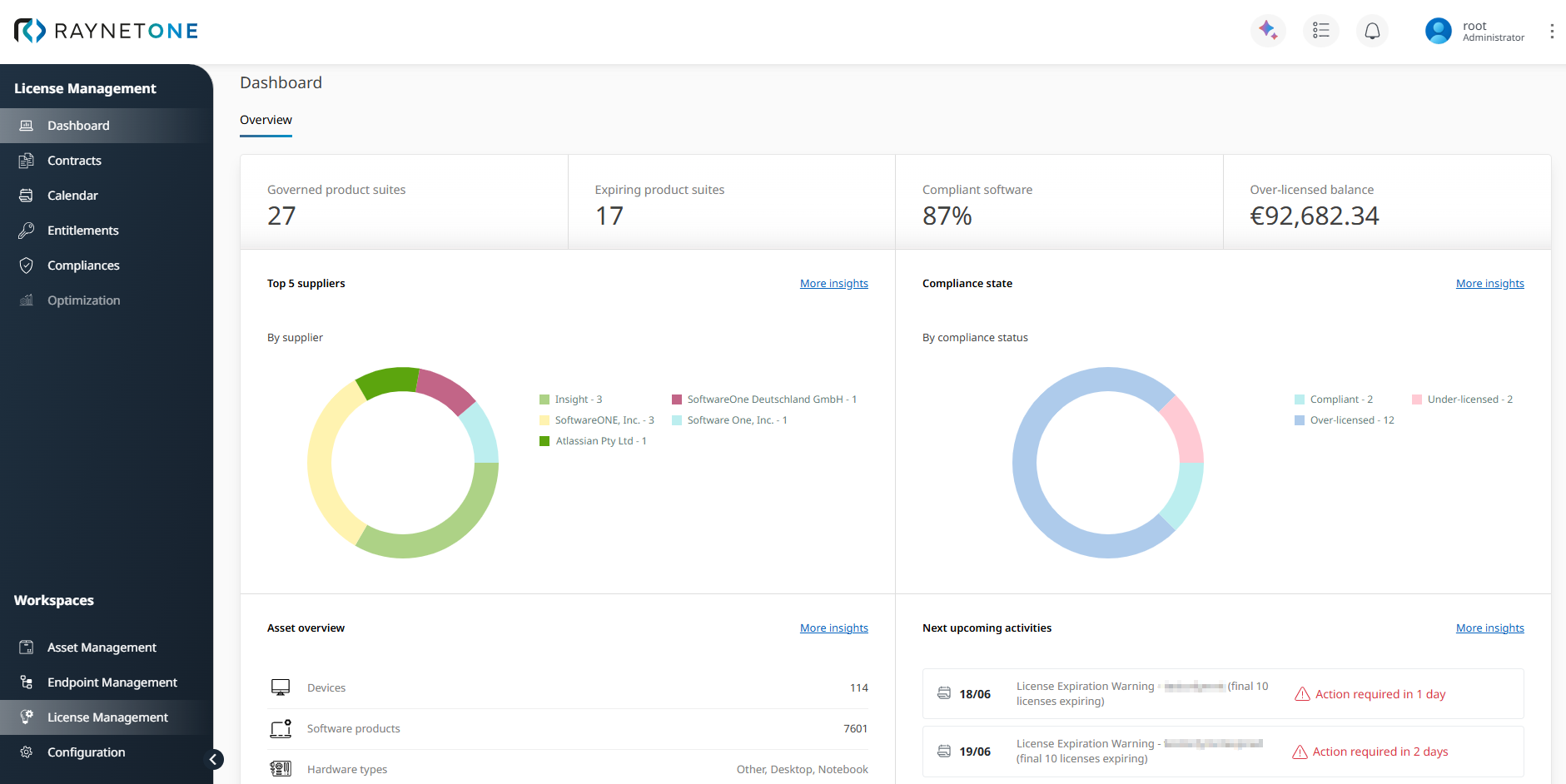
The figure above shows the upper dashboard area, including the KPI cards, the Top 5 suppliers chart, the Compliance state chart, the Asset overview, and the Next upcoming activities section.
Dashboard Sections
Below the KPI cards, the Dashboard displays a widget-based layout with visual indicators, charts, lists and activity summaries. Each section includes a More insights link for direct navigation to the relevant detailed area of the workspace.
Top 5 suppliers
This dashboard section uses a donut chart to visualize the distribution of licensed products by supplier. This quickly shows which vendors dominate your license spend and where supplier-focused review or optimization deliver the highest impact.
Compliance state
This dashboard section uses a donut chart to visualize the software portfolio by compliance state, such as compliant, under-licensed, and over-licensed positions. It gives you a high-level health status of the license portfolio at a glance. Detailed reconciliation and ELP analysis are handled in the dedicated Compliances section.
Asset overview
The Asset overview dashboard section connects LM with the technical estate. It shows key infrastructure context, such as the total number of devices and discovered software products.
Next upcoming activities
This dashboard section lists time-sensitive LM activities, such as license expirations, renewal dates, or contract-related deadlines. Clear warning messages (e.g., Action required in 8 days), help you identify items that need attention soon.
This section supports lifecycle and renewal management by guiding users directly to the Calendar for full renewal and lifecycle tracking.
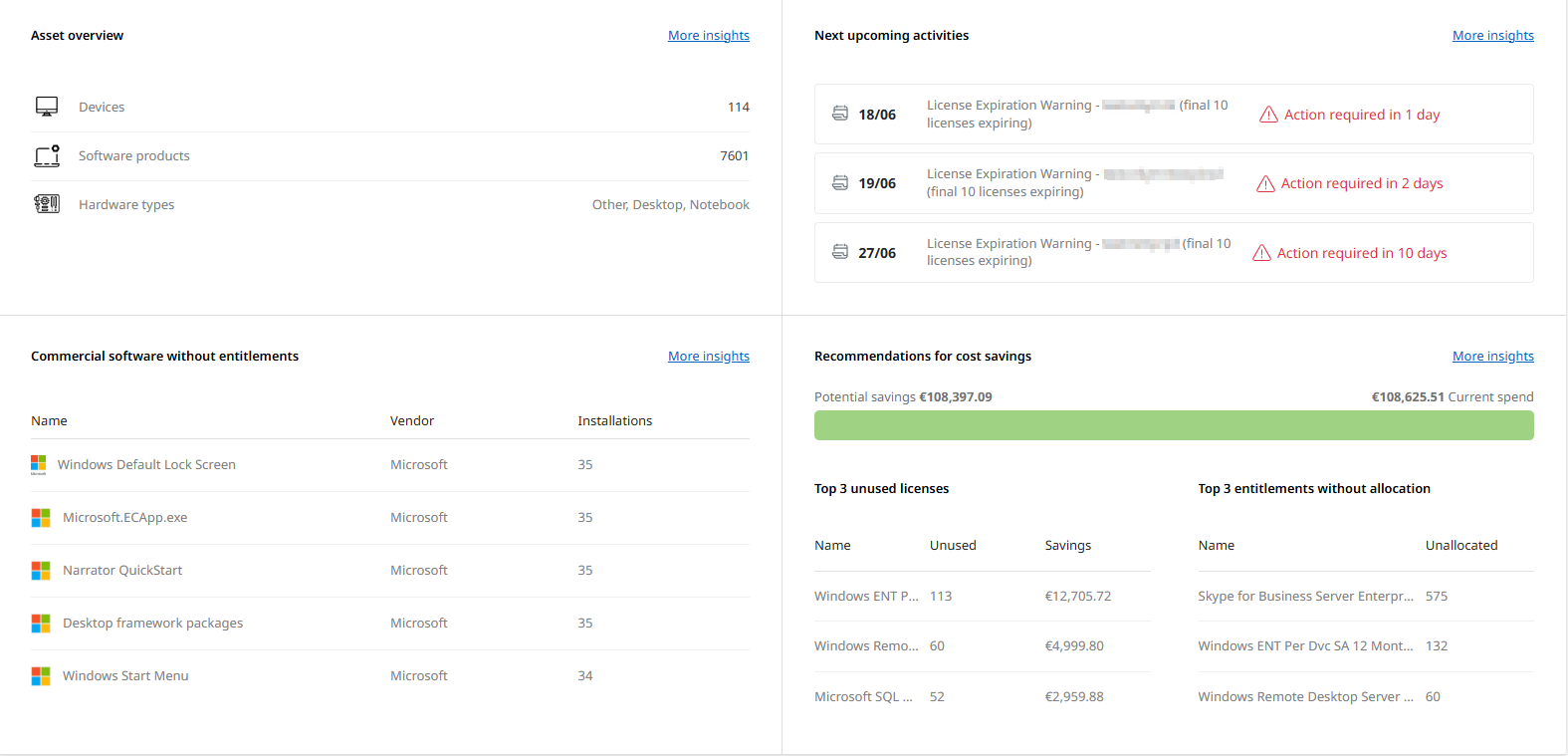
The figure above shows the lower Dashboard area, including Commercial software without entitlements and Recommendations for cost savings.
Commercial software without entitlements
This dashboard section shows a top list of commercial software installations that have been discovered in the environment but are not yet covered by any license entitlement. These items represent a major compliance and financial risk area that may require immediate review.
Recommendations for cost savings
Recommendations for cost savings provides a ranked overview of data-based optimization opportunities, such as the Top 3 unused licenses and the Top 3 entitlements without allocation. These findings help you identify where license reclamation, reallocation, or entitlement cleanup may reduce unnecessary software spend.
The License Management Workspace Dashboard is designed as a dynamic monitoring and navigation layer - not a static report. It efficiently guides users from broad visibility to targeted analysis and concrete actions across the full license lifecycle.