This view aggregates the discovery and inventory data of your Oracle databases.
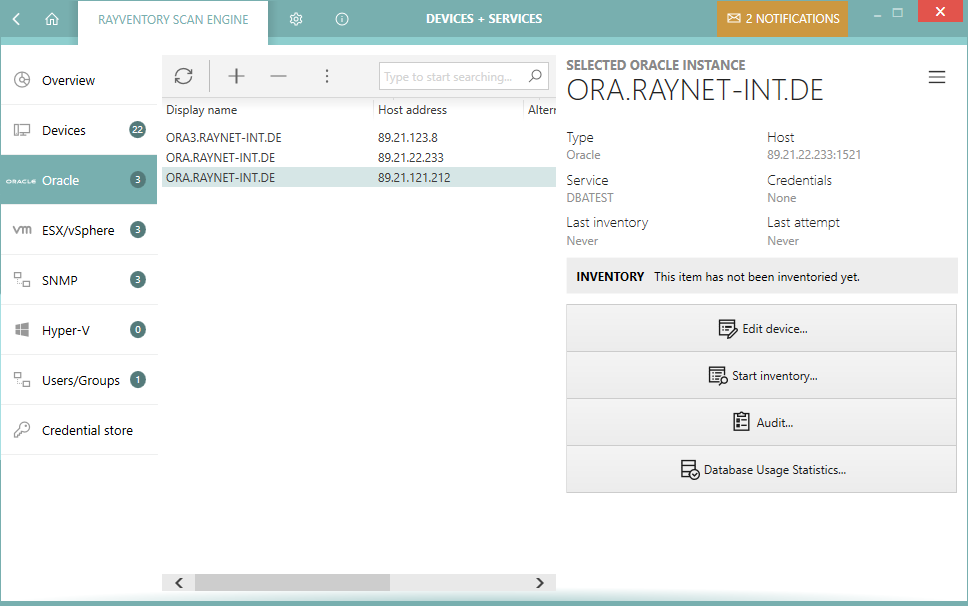
The view is divided into three parts:
•Toolbar - showing buttons to perform quick operations like adding, editing, and removing entries.
•Main grid - showing the list of all saved devices (physical and virtual).
•Sidebar - showing the details of the current selection including inventory data if available.
Columns
The grid supports a predefined set of columns. Out of these columns a handful is visible by default. It is possible to select more columns by pressing the Column chooser button in the grid toolbar. The following columns are available:
•Type - A static column with a connection icon (Oracle).
•Host name - The DNS hostname or IP address of the connection.
•Service - The name of the service.
•Port - The port used to communicate with the service.
•Status - The inventory status. There are 3 possible values:
on/a - The device has not been inventoried yet.
oOK - The device has been inventoried and returned some results.
oIn any other case, the column Status contains a short description of the most recent issue.
•Last inventory attempt - The last time the inventory has been started (whether successful or not).
•Credentials - The logical names of credentials used when scanning this device.
•Capabilities - The short version of enumeration of allowed inventory capabilities for this device. The string consists of two-letter tokens, with the following meaning:
oZT = Zero-Touch
oRE = Remote-Execution
oFS = Access to File System
oSMB = Upload to SMB Shares
oWMI = Windows Management Instrumentation (WMI) Queries
oWSM = Windows Service Manager
•Last inventory attempt (time) - The last time the inventory has been started (whether successful or not) (contains full date and time).
•Last inventory - The last time the inventory has been successfully started (only date part).
•Last inventory (time) - The last time the inventory has been successfully started (contains full date and time).
•Last successful inventory method - The name of the last inventory method that worked for this device. This method will be preferred in future scans.
•Last failed inventory methods - The names of inventory methods that failed the last time the device was scanned.
•Last failed inventory method (details) - Details about the methods that failed when the device was scanned for the last time.
•Show inventory - Shows the inventory details (only available if an inventory has been already performed).
•Created - The date when the device was created or imported.
Context Menu
Pressing Right-Mouse-Button after highlighting an item opens a context menu for it.
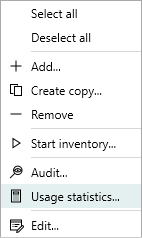
•Select all - Selects all visible entries in the grid.
•Deselect all - Deselects all visible entries in the grid.
•Add... - Opens the New Database Dialog.
•Create copy... - Opens the New Database Dialog where the default values are automatically set to the values from the current selection.
•Remove - Removes the currently selected devices (see Removing Oracle connections).
•Start inventory... - Opens the Inventory Wizard for the currently selected devices.
•Audit... - Starts an audit for the currently selected connections.
•Usage statistics... - Starts Database Feature Usage Statistics for the currently selected connections.
•Edit... - Opens the Edit Database connection
|
Note: Some options may be conditionally hidden or disabled (for example the menu item Edit... is disabled if more than one device is selected). |
