This view allows you to manipulate IIS web sites, as well as configuration and options of IIS that will be installed on the target system.
Since IIS handling is not part of the MSI Standard, RayPack utilized special Installer database tables to manage IIS related information until a package is built from the project:
•RPIIsAppPool - Application pool property definitions
•RPIIsWebAddress - Relation between web sites and their addresses on the IIS
•RPIIsWebApplication - Registered web applications
•RPIIsWebApplicationExtension - Mapping between web applications and extensions
•RPIIsWebDirProperties - Directories on the IIS
•RPIIsWebLog - References of available log file formats
•RPIIsWebServiceExtension - Mapping between web services and extensions
•RPIIsWebSite - Websites on the IIS
•RPIIsWebVirtualDir - Virtual directories for websites on the IIS
If these tables have not been present within the current packaging project before, they are automatically added with the first requirement by an ISS object created within the project. Please refer to the section about Custom RayPack installer database tables for further details and table specifications.
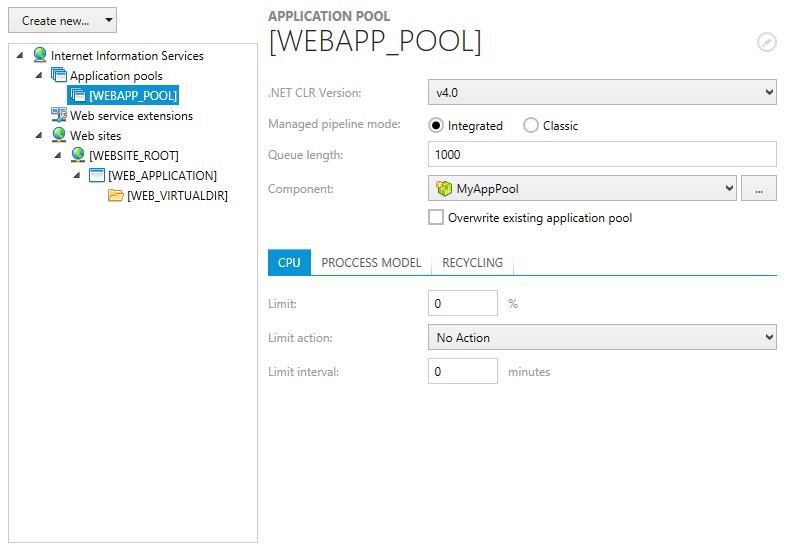
The IIS view is separated into two main areas:
•A tree view structure of already available IIS objects on the left-hand side
This hierarchy is structured by the available main IIS object types: Application pools, Web service extensions and Web sites.
•A details pane for viewing and editing the properties of already existing IIS objects at the right-hand side
To access the Installer database counterpart of an IIS item, users have to right-click its list object, and select Go to row from the context menu. The required database table is loaded, with a highlight set on the matching data row.
Standard IIS Management Procedures
Common management procedures for IIS objects are described within the following topics:
•Add an IIS web service extension