A task can either be started manually or automatically via a schedule. To enable the schedule mode, select the checkbox Enable automatic task execution.
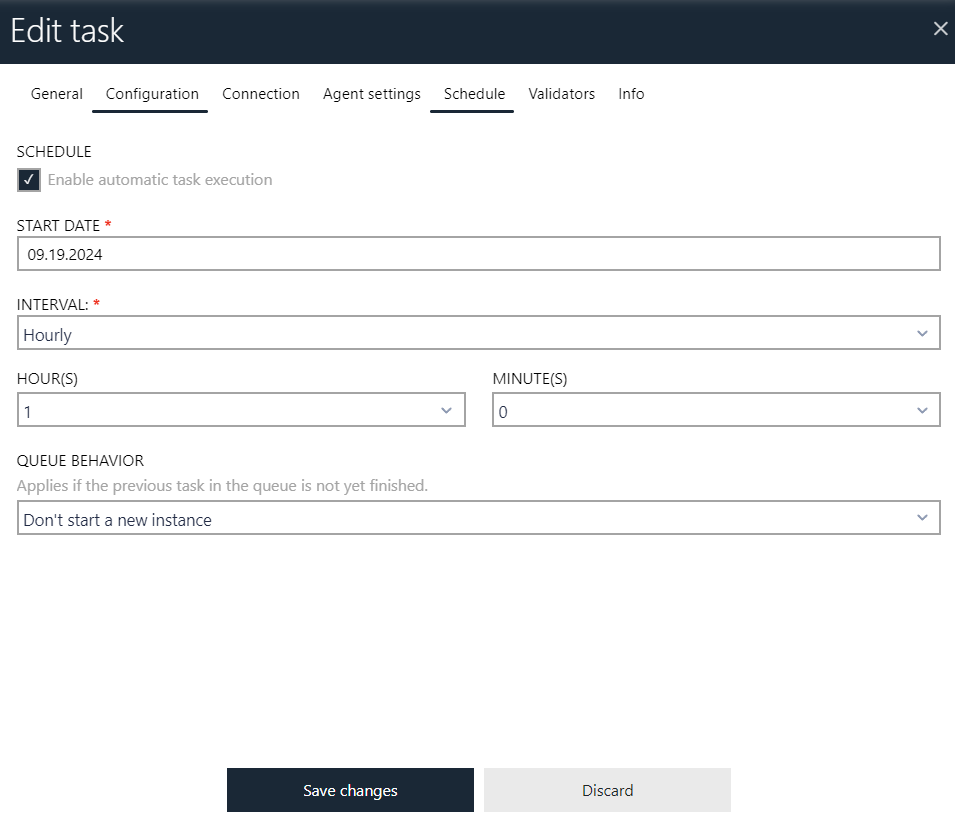
•Start date
The initial date from which the schedule is active.
•Interval
The schedule mode (minutes, hours, daily, weekly, monthly or advanced)
•Interval options
Depending on the selected interval (previous drop-down) different options may be shown. If the Advanced interval is selected, a CRON expression is required as an input. Refer to internet sources, for example https://www.quartz-scheduler.net/documentation/quartz-3.x/tutorial/crontriggers.html#cron-expressions to learn more about available options.
•Next execution preview
After configuring the interval, the system automatically calculates and displays the next scheduled execution time based on the current cron expression and start date. The preview is labeled Next execution (your local time): and shows the upcoming run in your browser's local time zone. The preview updates dynamically as you modify the interval or start date. If the schedule configuration contains an error, the message "Could not calculate the next execution for this schedule" is shown instead.
•Queue behaviour
This configures what to do if two scheduled executions overlap. It is possible to either ignore the second (newer) execution, or have it run as soon as the current one finishes. The default option Don't start a new instance is usually the best choice.