API keys provide a secure and flexible way to manage access to specific data sets, ensuring precise control over data retrieval. Through the admin interface, administrators can configure API key permissions with fine-grained access control, restricting data access at both the table and row levels. This ensures that users only view relevant data based on predefined scopes, limiting access to authorized information.
Each API key can be configured with an explicit list of allowed tables to limit data access to specific sets. For broader access, wildcards (*) can be used as a placeholder to grant access to all tables. The use of wildcards (*) should be applied cautiously to avoid unintended data exposure. If no tables are specified for an API key, the default behavior permits access to all tables.
Adding an API Key
To add an API key, navigate to Profile in the top right corner, select Profile, provide a name for the API key, choose a tenant, and then proceed to configure Permissions. Access restrictions for an API key can be configured in multiple ways: Table-Level Access Restrictions, Row-Level Access Restrictions, and Request-Level Filtering. Details for each option are provided in the sections below.
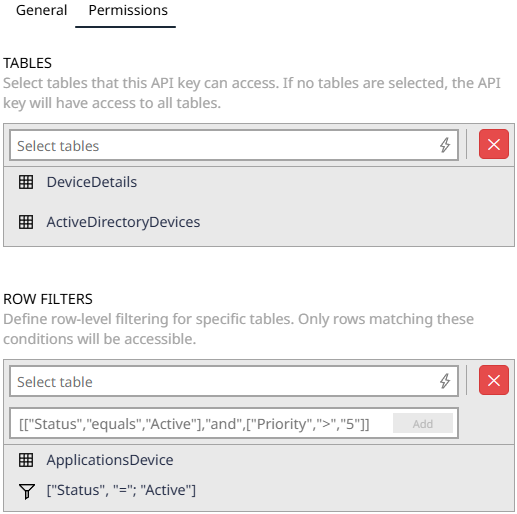 |
Table-Level Access Restrictions: API keys can be configured to restrict access to specific tables. For example:
•Specific tables: Catalog_v2-Software, Catalog_v2-SoftwareManufacturer •Wildcards: Catalog_* (includes all tables starting with Catalog_), * (includes all tables in the system)
Row-Level Access Restrictions: API keys can be configured with row filters for specific tables. For example:
•Specific Table: Catalog_v2-SoftwareManufacturer •Row Filter: [["Name", "notcontains", "C"], "and", ["ManufacturerId", "<>", "213BA2D4-77FD-4519-9006-00B769C73E05"]]
With this configuration the API key will only return rows from the Catalog_v2-SoftwareManufacturer table that match the specified row filter conditions when accessing the specified table through resultDatabase endpoints, ensuring precise and secure data retrieval. |
 |
Request-Level Filtering: Additional filters can be applied directly in API requests using the filter query parameter.
Combined Filtering Logic: When configuring API key access for ResultDatabase endpoints, both row filters and request-level filters can be applied together, combining their restrictions using AND logic to ensure precise and secure data access. |
Access Rule Operators
Complex rules can be established to combine table-level and row-level restrictions, ensuring tailored data access while preventing injection risks. For each table, a set of operators can be used to configure granular access rules, restricting data exposure to authorized sets. Available operators are listed below:
Category |
Operations |
|---|---|
Equality checks (for numbers, strings, dates) |
=, >=, >, <=, <, <> |
String operators |
Contains, StartsWith, EndsWith, NotContains |
Nullability checks |
IsNull, IsNotNull |
Boolean operations |
And, Or |
Each API key should be configured to ensure that requests targeting tables not in the allowed list are denied, returning a descriptive error message to maintain secure and predictable behavior.
For detailed information on filter syntax, operators, and usage examples for request-level filtering, see Advanced Filtering.
API Endpoints for Secure Data Access
The following API endpoints enable secure and controlled access to data by providing specific tables or rows based on defined permissions.
Endpoint: |
/v1/ResultDatabase/resultTable/paged |
Description: |
Get a paged table result in a format as requested in the accept header. |
Documentation: |
Endpoint: |
/v1/ResultDatabase/table |
Description: |
Retrieve a list of table names available in the system. |
Documentation: |
Endpoint: |
/v1/ResultDatabase/table/{tableName} |
Description: |
Export a complete table result as a CSV file without pagination. |
Documentation: |
Endpoint: |
/v1/ResultDatabase/table/{tableName}/paged |
Description: |
Export a paged table result as a CSV file. |
Documentation: |
Endpoint: |
/v1/ResultDatabase/resultTable |
Description: |
Retrieve the complete table result in CSV format without pagination. |
Documentation: |
See Also
•Authentication and Authorization