Software vulnerabilities (e.g. EoL and EoS software being installed on devices) can interfere with your IT assets' performance and, thus, challenge your entire IT security. This is why Raynet One includes functions that help you identify and analyze both security leaks and vulnerable assets. On the basis of intelligent tools running in the background, the platform offers an automated search and display of known vulnerabilities. Find out about ways to take a deep-dive into your assets' vulnerability status and implicit threats in the following chapters.
There may be vulnerabilities lurking in your IT landscape which are not yet listed. Many reasons exist for this lack of information, more or less reasonable. First and foremost, a grace period is given to vulnerabilities and the publication can be seen as attack motivation. Malicious interests could treat vulnerability information as secret to sell for big cash. Hard to find vulnerabilities are likely to stay undetected. Vendors do not want to risk their reputation or underestimate the risk implied by a fault in their products.
Vulnerability score and CVSS severity ranges
Each vulnerability item is assigned a score by CVE. Use it to get an impression of the vulnerability's severity. The score follows the Common Vulnerability Scoring System (CVSS) v3.x/v4.0 classification, which defines five severity categories on a scale from 0.0 to 10.0:
•None (score: 0.0) — No impact; the vulnerability poses no risk.
•Low (score: 0.1–3.9) — Limited impact requiring specific conditions to exploit.
•Medium (score: 4.0–6.9) — Moderate impact; consider remediation as part of regular maintenance.
•High (score: 7.0–8.9) — Significant impact; plan remediation promptly.
•Critical (score: 9.0–10.0) — Severe impact; prioritize immediate remediation.
These severity ranges are applied consistently across all vulnerability views in Raynet One, including the Security Management dashboard, the Overview dashboard severity-score legend, the Vulnerabilities list, and the device and software vulnerability detail views. Filtering or sorting by score in any of these views follows the same CVSS v3.x/v4.0 boundaries.
EPSS score and percentile in vulnerability details
Starting with Raynet One 2026.4, the Exploit Prediction Scoring System (EPSS) is available in the Vulnerability Details view under Details. EPSS provides a data-driven probability estimate of how likely a given vulnerability is to be exploited in the wild within the next 30 days, expressed as two values:
•EPSS Score — A probability value between 0 and 1 (displayed as a percentage, e.g., 0.045 = 4.5%). It estimates the likelihood that this specific vulnerability will be actively exploited within the next 30 days. A higher score indicates a greater probability of exploitation.
•EPSS Percentile — Indicates the relative rank of this vulnerability among all vulnerabilities scored by EPSS. For example, a percentile of 90 means this vulnerability scores higher than 90% of all other scored vulnerabilities in terms of exploitation probability.
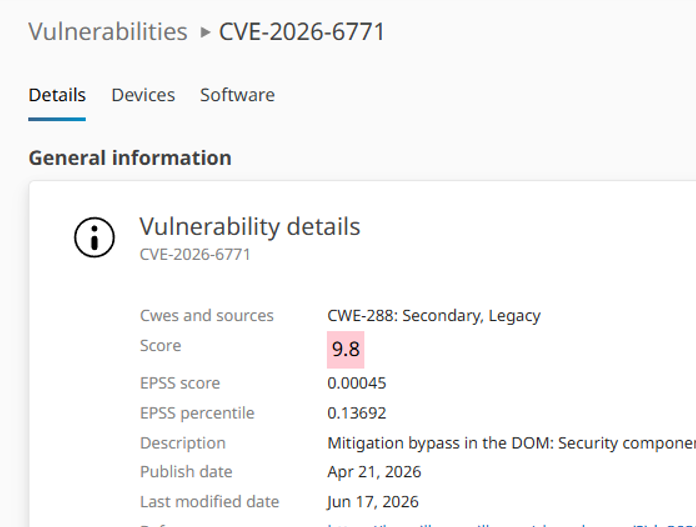
The Details tab in the Vulnerability Details view showing the EPSS Score and EPSS Percentile fields alongside the standard CVSS score information.
EPSS vs. CVSS: understanding the difference
CVSS and EPSS serve different purposes and complement each other when assessing risk:
•CVSS measures the severity of a vulnerability — how bad the potential damage could be if the vulnerability were exploited. It assesses characteristics such as attack complexity, privileges required, and impact on confidentiality, integrity, and availability. The CVSS score is static and does not change with threat activity.
•EPSS measures the likelihood of exploitation — how probable it is that attackers will actively target this vulnerability in the near future. EPSS values are updated daily based on observed exploit activity, threat intelligence feeds, and other data sources.
Use both scores together to prioritize remediation efforts effectively: a vulnerability with a high CVSS score but a very low EPSS score may be severe in theory but rarely exploited in practice, while a moderate CVSS score combined with a high EPSS score signals an actively targeted vulnerability that warrants prompt attention.
Common structure of vulnerability descriptions/reports
Vulnerability descriptions are designed to deliver critical insight into risk and severity in a brief form. Connect the dots to evaluate their impact on your whole IT landscape. The following points are usually found in them.
1.product explanation and advertisement
2.mention of affected product technical and internal components
3.logical deduction of the flaw by scenario and conditions
4.technical vulnerability term, phrased more or less clearly
5.(optional) disclaimer
For several reasons, it is easy to lose track in the vast vulnerabilities feed. Some vulnerabilities are described in unnecessary technical depth. Unclear phrasing is used, to classify the actual vulnerability (effect, danger). Description text tends to deviate from the recommended text structure. Last but not least, the impact on your IT landscape does not equal to the vulnerability score.
Important technical vulnerability terms
Common strong technical terms are used to describe the vulnerability clearly. Here are some reoccurring ones which you should learn.
•Exposure of sensitive information, use-after-free
•stack-based buffer overflow, out-of-bounds array read/write
•remote core execution, execute arbitrary code
•memory consumption (system resource denial or abuse)
•Cross-Site Scripting (XSS) (web technology hijacking)
•authenticate on behalf of the user, privilege escalation, improper access controls
•race condition (exploitation of questionable product technical design)
•denial-of-service
Finding affected devices
The affected devices are found using proprietary fingerprinting technology. It collects hashes and, possibly, qualifying file properties (vendor string, digital signature properties). It's matched against data from the Technology Catalog to determine product name and, reducing any ambiguities, the vulnerability records. Collected inventory is used to relate to devices and operating systems.
Language Column in the Fingerprints Table
The Language column in the Fingerprints table displays human-readable language names, for example English or Polish, instead of numeric LCID codes. This makes it easier to identify the language of a fingerprint entry without cross-referencing a separate code table.