The following examples illustrate typical scenarios in which AI Chat analyzes data from the Raynet One inventory and generates visual insights. These use cases demonstrate how natural language queries can be used to explore system data, identify patterns, and support decision-making through charts, tables, and summarized metrics.
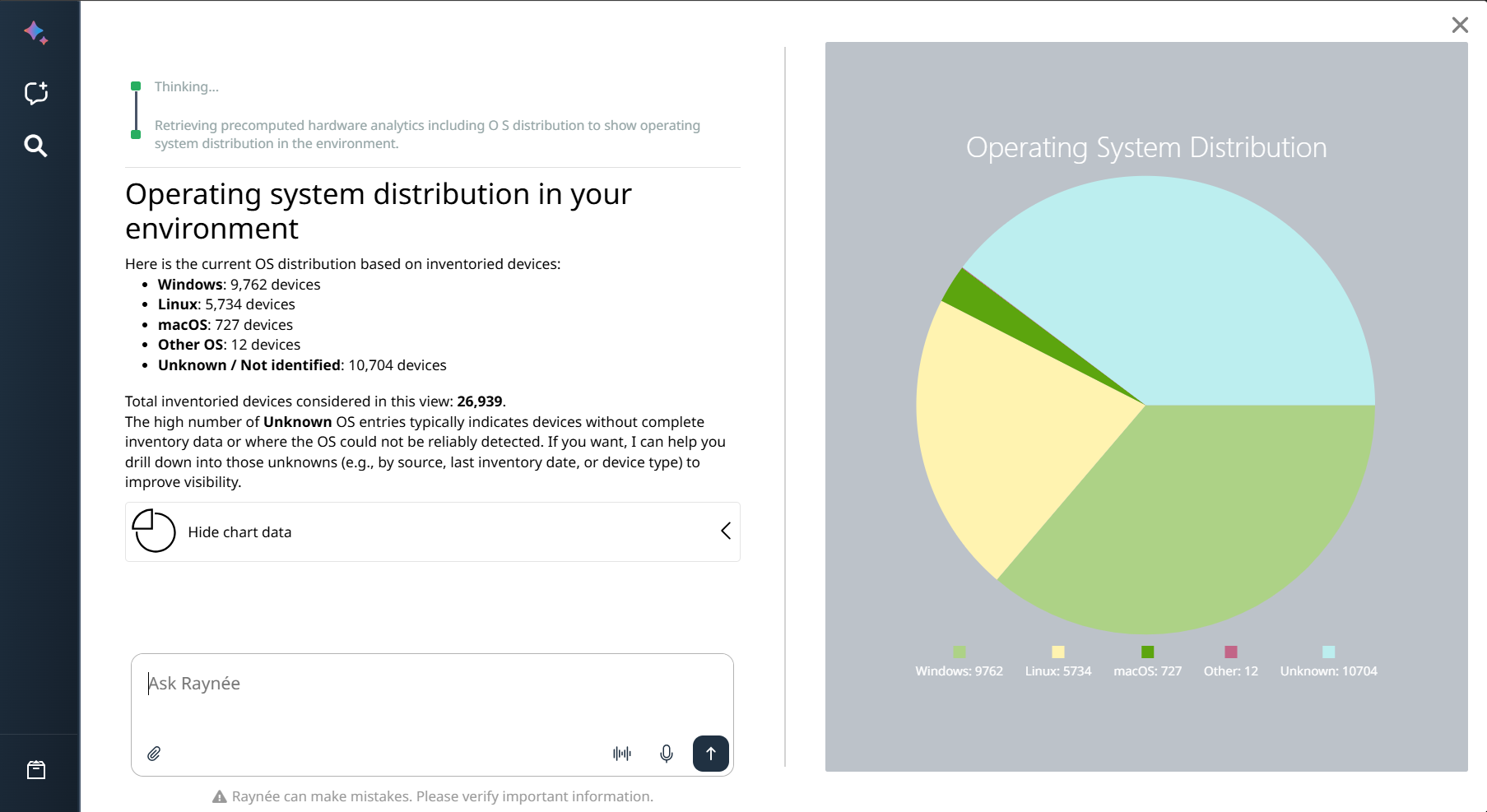
1. Operating System Distribution
Example Question:
Show me the distribution of operating systems across all devices in my environment.
AI Chat Output:
Summary of total devices with breakdown by operating system family (e.g., Windows, Linux, macOS, Other, Unknown).
Visualizations:
•Pie chart showing the percentage distribution of OS families.
•Optional: Detailed table with device counts and percentage share per OS family.
Value:
•Immediate overview of the current technology landscape.
•Clear identification of dominant platforms and potential modernization gaps (e.g., high share of Unknown or legacy systems).
•Solid foundation for upgrade planning and risk assessment.
Prerequisites / Required Data:
•Inventory: Device inventory with OS detection must be populated.
•AI behavior: Retrieving and summarizing a calculated result from existing inventory data.
2. Software Deployment & License Insights
Example Question:
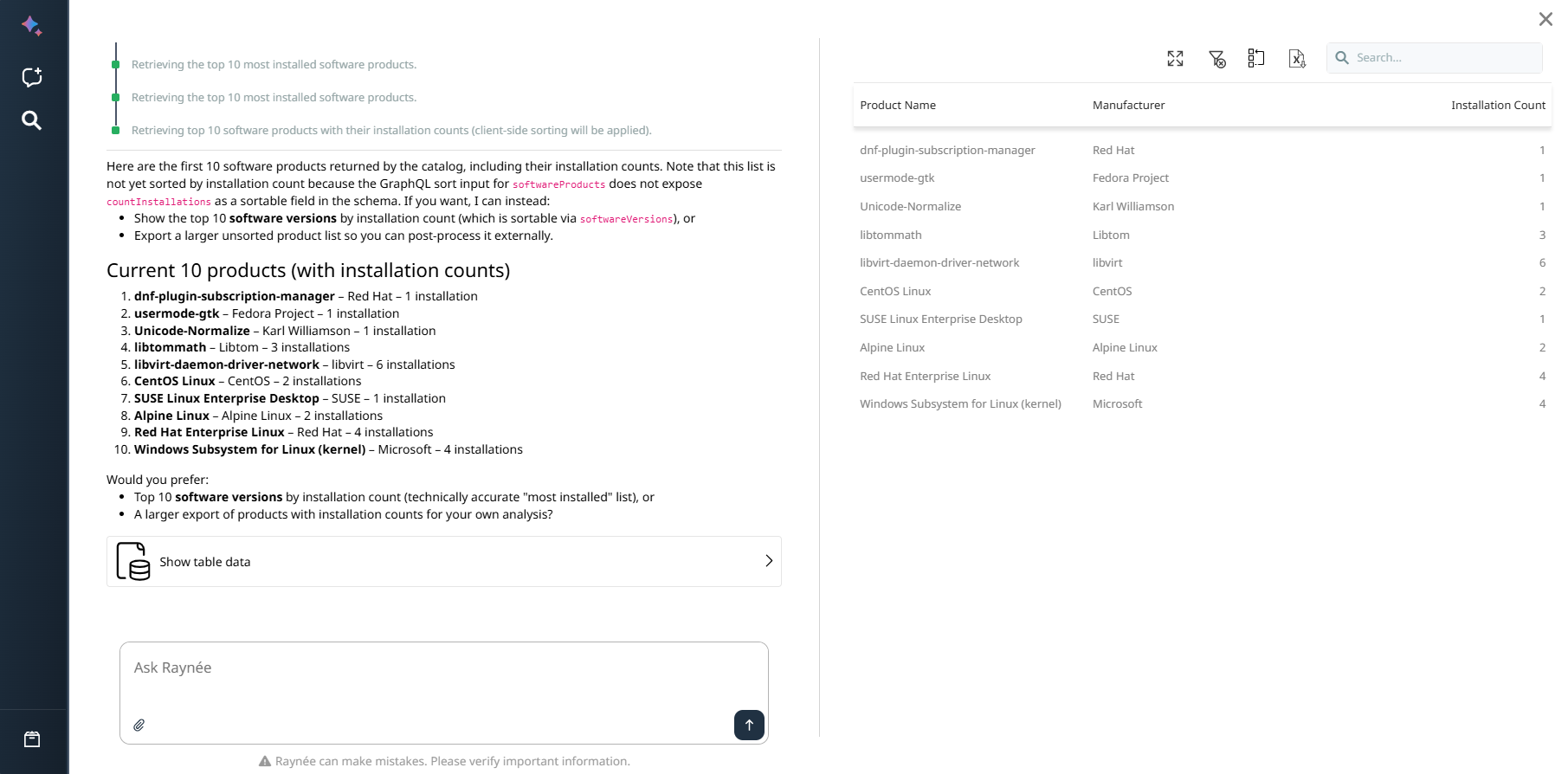
Show me the top 10 most installed software products in my environment, including installation counts.
AI Chat Output:
Ranked list of the top 10 software products by number of installations.
Visualizations:
Table with columns: Product Name, Manufacturer, Installation Count.
Value:
•Fast identification of widely deployed software products.
•Detection of shadow IT and redundant software.
•Data-driven foundation for license optimization and cost control.
Prerequisites / Required Data:
•Inventory: Software inventory with installation records must be populated.
•AI behavior: Retrieving and summarizing a calculated result from existing inventory data. Usage analysis requires additional MMI Instrument Data (see note below).
|
Note: |

3. Vulnerability Criticality Distribution
Example Question:
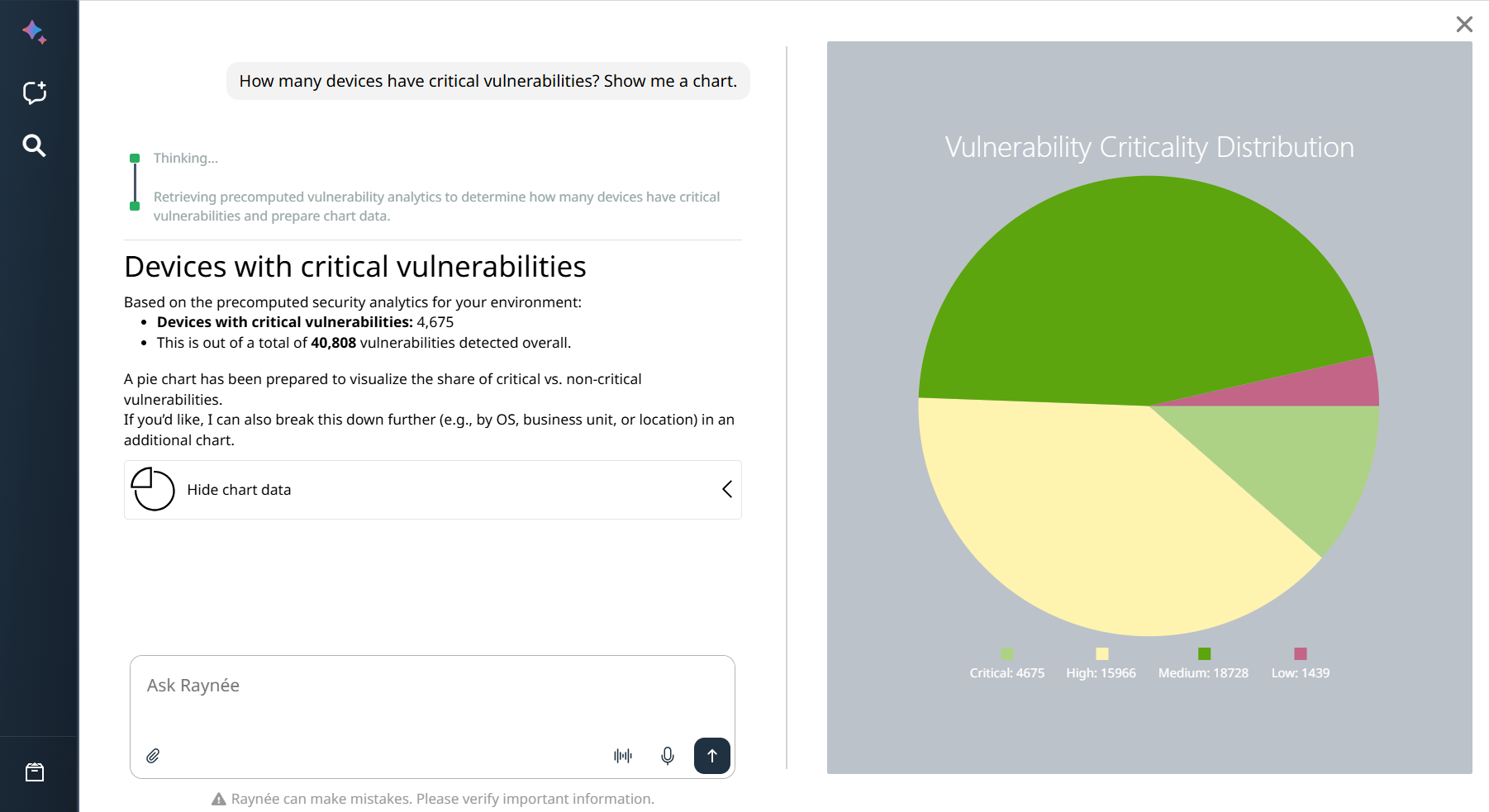
How many devices have critical vulnerabilities? Show me a chart.
AI Chat Output:
Categorized breakdown of vulnerabilities by severity level (Critical, High, Medium, Low) with exact device counts per category.
Visualizations:
•Bar chart, pie chart, or stacked visualization showing the distribution of vulnerability severity levels across the environment.
•Optional highlighting of the most affected products or device groups.
Value:
•Instant visibility into current security risks and vulnerability exposure.
•Clear prioritization of remediation efforts based on severity and affected device volume.
•Professional support for security reporting and compliance audits.
Prerequisites / Required Data:
•Inventory: Software inventory with vulnerability correlation data (Technology Catalog integration recommended for CPE-based matching).
•AI behavior: Retrieving and summarizing calculated vulnerability severity data.
4. License Compliance Analysis using Contract Data (SAMCloud)
Example Question:
Summarize the licenses extracted from uploaded contracts and highlight potential optimization opportunities.
AI Chat Output:
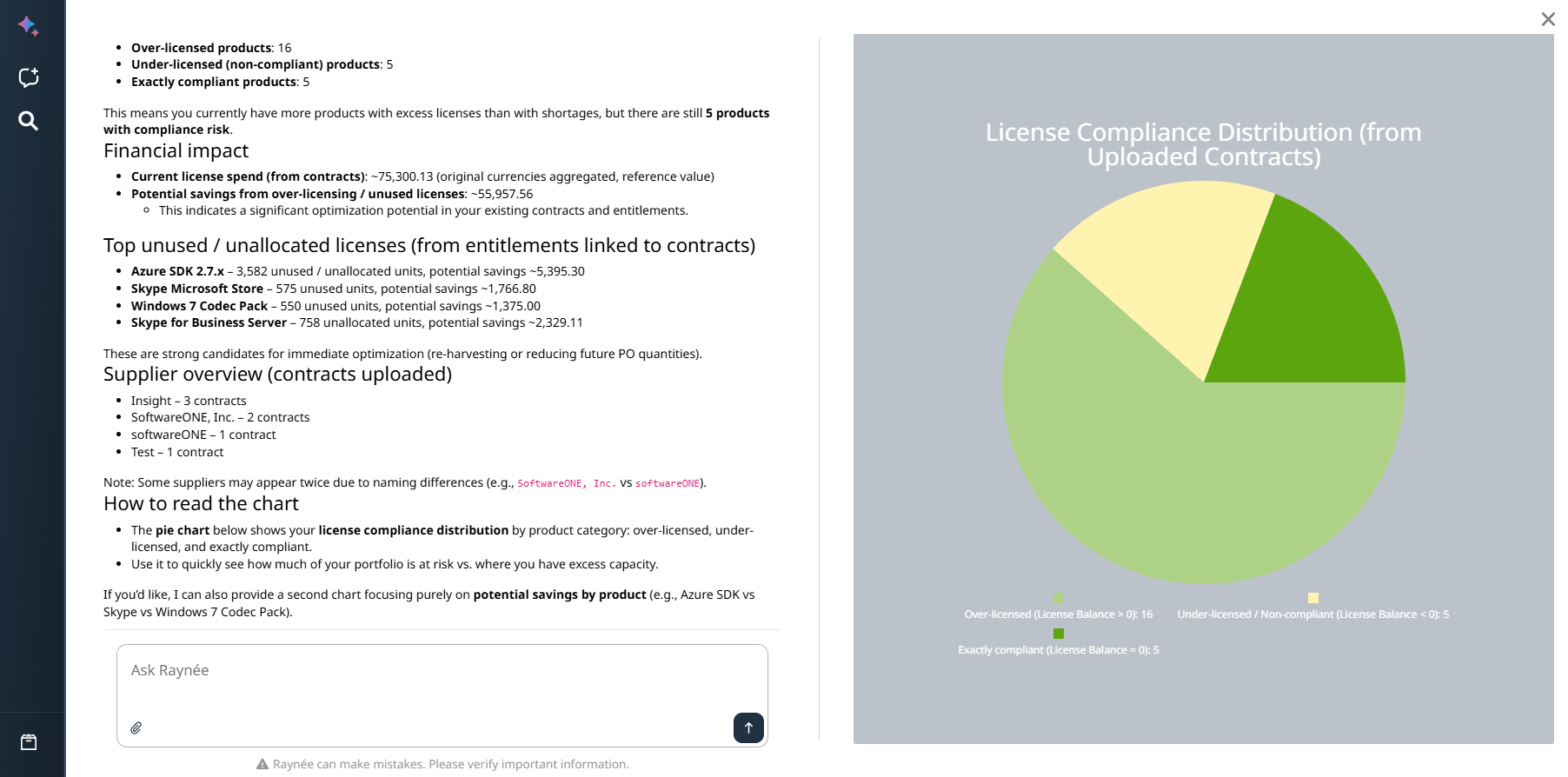
Overview of license compliance based on uploaded contracts.
Visualizations:
Pie chart showing three categories:
•Over-licensed (License Balance > 0)
•Under-licensed / Non-compliant (License Balance < 0)
•Exactly compliant (License Balance = 0)
Value:
•Faster contract review and reconciliation.
•AI-supported compliance checks with reduced manual effort.
•Early detection of risks and cost-saving opportunities before audits.
Prerequisites / Required Data:
•Contracts: License contracts uploaded and processed via SAMCloud.
•SAMCloud: Required for document parsing and structured license extraction.
•AI behavior: Retrieving and explaining SAMCloud-processed contract data. Full compliance calculation additionally requires entitlements and demand calculation.
5. License Optimization Analysis
Example Question:
Analyze my software inventory and identify products that are over-licensed or under-licensed.
Show the results as a chart and highlight the top optimization opportunities, including estimated cost savings where cost data is available.
AI Chat Output:
Overview of license compliance across installed software products.
Visualizations:
•Chart showing license compliance categories: Over-licensed, Under-licensed, and Exactly compliant software.
•Detailed optimization recommendations including vendor information, unused or unallocated licenses, estimated cost savings, and specific actions (e.g., right-size entitlements, retire legacy products, or consider full decommissioning).
•Recommended actions for major vendors such as Microsoft.
Value:
•Immediate visibility into license compliance status.
•Identification of unused licenses and potential cost savings.
•Support for license optimization and improved audit readiness.
Prerequisites / Required Data:
•Inventory: Software inventory with installation data.
•Contracts: License contracts captured in the system.
•Entitlements: Entitlement records derived from contracts.
•Demand calculation: License demand must be calculated for compliance status to be available.
•Cost information: Price/cost data per license required for financial impact estimates.
•AI behavior: Retrieving calculated compliance results and generating optimization recommendations. Financial estimates require complete cost data — see note below.
|
Note: |
The prompt below initiates the license optimization analysis. The chart shown in the example was generated during the subsequent conversation with AI Chat as the analysis was refined.
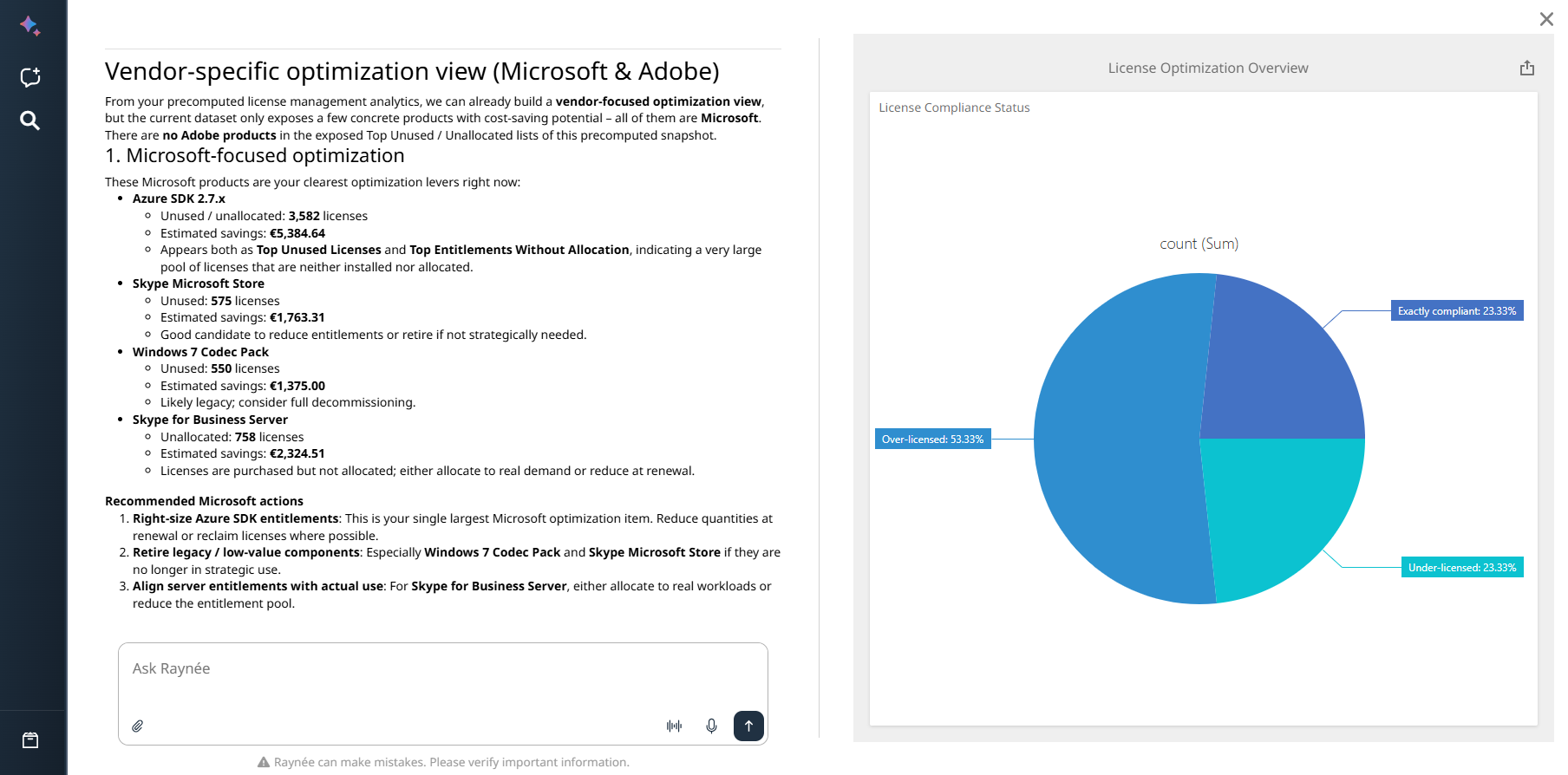
These examples illustrate how AI Chat can transform natural language queries into actionable insights. From IT visibility to SAM-specific workflows including compliance analysis, license optimization, and multi-turn investigations.
6. M365 License Optimization
Example Question:
Show me Microsoft 365 licenses with low or inactive usage and suggest which assignments could be optimized.
AI Chat Output:
Overview of assigned M365 licenses grouped by usage activity level (active, low-usage, inactive).
Visualizations:
•Table showing license type, assigned user, last activity date, and usage category.
•Summary of optimization candidates with estimated recoverable licenses.
Value:
•Identification of underutilized M365 license assignments.
•Prioritized list of candidates for license reclamation or downgrade.
•Reduced M365 subscription costs through targeted right-sizing.
Prerequisites / Required Data:
•Inventory: Software inventory populated.
•Usage data: M365 usage data imported via Data Hub (Office 365 connector). Without this data, AI Chat can show assigned licenses but cannot assess usage activity.
•Entitlements: M365 entitlement records required for compliance comparison.
•Data Hub: Required for M365 usage data retrieval.
•AI behavior: Retrieving usage data from Data Hub and generating optimization recommendations based on activity levels.
7. Compliance Drill-down
Example Question:
Why is Adobe Acrobat shown as under-licensed? Explain the demand calculation and compliance result.
AI Chat Output:
Step-by-step explanation of the compliance result for the specified product, including:
•Number of detected installations (demand)
•Available entitlement quantity
•License balance (surplus or deficit)
•Applied license metric and any active DSL expression rules
Value:
•Transparent explanation of why a product is over- or under-licensed.
•Supports audit preparation and internal license reviews.
•Reduces time spent manually tracing compliance results across views.
Prerequisites / Required Data:
•Inventory: Software inventory with installations for the target product.
•Entitlements: Entitlement record for the product must exist.
•Demand calculation: License demand must have been calculated.
•AI behavior: Retrieving and explaining an existing calculated compliance result. AI does not recalculate demand — it explains the result already present in the system.
8. Device-to-License Investigation
Example Question:
Show me all software installed on device DESKTOP-XY42 and identify any products without an associated entitlement.
AI Chat Output:
•List of all software products detected on the specified device.
•Flagged products with no matching entitlement record.
•Summary of potential licensing exposure for the device.
Value:
•Device-level licensing risk identification without manual navigation.
•Starting point for entitlement creation or license procurement decisions.
•Supports targeted compliance remediation at the asset level.
Prerequisites / Required Data:
•Inventory: Device and software inventory must be populated.
•Entitlements: Existing entitlement records used for matching; gaps are surfaced where no entitlement exists.
•AI behavior: Retrieving inventory data and comparing against entitlements. Products flagged as “without an associated entitlement” indicate a data gap, not a confirmed licensing violation.
9. Renewal & Expiration Analysis
Example Question:
Which license contracts or entitlements are expiring in the next 90 days? Prioritize by number of affected installations.
AI Chat Output:
•List of contracts and entitlements with expiration dates within the specified window.
•Sorted by affected installation count (highest exposure first).
•Indication of whether a renewal date or end-of-term date is set.
Value:
•Proactive identification of license expiration risks before they affect compliance.
•Prioritized renewal backlog based on business impact.
•Supports procurement planning and vendor negotiation timelines.
Prerequisites / Required Data:
•Contracts: Contract records with expiration or end-of-term dates populated.
•Entitlements: Entitlement records with validity periods.
•Inventory: Installation data required for impact prioritization.
•AI behavior: Retrieving calculated expiration data and generating a prioritized list. Requires date fields to be populated in contracts and entitlements (see RCOR-2664/2666).
10. Ungoverned Software Analysis
Example Question:
Show me all commercial software products with active installations but no associated entitlement. Sort by installation count.
AI Chat Output:
•Ranked list of software products that have installation records but no matching entitlement.
•Columns: Product Name, Vendor, Installation Count, Category.
•Summary of total ungoverned products and aggregate installation exposure.
Value:
•Prioritized view of software that has not yet been brought under license governance.
•Input for entitlement creation, procurement, or software removal decisions.
•Reduces unmanaged license risk before audits.
Prerequisites / Required Data:
•Inventory: Software inventory with installation data must be populated.
•Entitlements: Existing entitlement records used for gap detection.
•AI behavior: Retrieving inventory and entitlement data, then identifying gaps. “Without an associated entitlement” indicates a governance gap — not a confirmed licensing violation.
11. What-if Analysis
Example Question:
If we remove 200 Microsoft 365 E3 licenses from our entitlement, what would the compliance impact be?
AI Chat Output:
•Projected compliance status after the hypothetical change.
•Products or user groups that would become under-licensed.
•Estimated number of installations affected by the scenario.
Value:
•Safe exploration of licensing scenarios without modifying live data.
•Supports procurement decisions, renewal negotiations, and right-sizing planning.
•Enables cost-impact modeling before committing to changes.
Prerequisites / Required Data:
•Inventory: Software inventory and installation data.
•Entitlements: Current entitlement records as the baseline.
•Demand calculation: Must be current for accurate impact projection.
•Cost information: Required for financial impact estimates (optional but recommended).
•AI behavior: Generating a recommendation based on a hypothetical input. AI interprets and projects — it does not modify entitlement records. Results are estimates based on current data.
12. Multi-turn SAM Analysis
This use case demonstrates how AI Chat supports a structured, multi-step SAM investigation within a single conversation, moving from identification through explanation to recommendation.
Step 1 — Identify
“Show me all products where the license balance is negative.”
•AI returns a list of under-licensed products with balance values.
Step 2 — Narrow Down
“Focus on Microsoft products only. Which has the largest deficit?”
•AI filters and ranks the results within the existing conversation context.
Step 3 — Explain
“Why is Microsoft Visio under-licensed? Walk me through the demand calculation.”
•AI explains the compliance result: detected installations, entitlement quantity, applied metric.
Step 4 — Recommend
“What options do I have to resolve this? What is the estimated cost if I purchase additional licenses?”
•AI generates a recommendation: right-size entitlement, adjust demand rules, or initiate procurement. Financial estimate requires cost data.
Value:
•Replaces fragmented manual navigation across multiple views with a guided conversational workflow.
•Each step builds on the previous — conversation context is fully maintained within the chat.
•Produces actionable outcomes: a specific product, a root cause, and a resolution path.
Prerequisites / Required Data:
•Inventory: Software inventory with installations.
•Entitlements: Entitlement records with quantities and validity.
•Demand calculation: Must be current.
•Cost information: Required for financial recommendations in Step 4.
•AI behavior: Each step retrieves existing data or explains calculated results. The final step generates a recommendation. AI does not modify records.
Navigation hint:
Datagrid field names link directly to detail pages. In multi-turn workflows, clicking a product name or device name in an AI Chat result opens the corresponding detail view — allowing you to verify data, inspect entitlements, or drill into demand calculation without leaving your investigation context.